Thursday, July 21, 2016

Android tips and tricks: Tips to avoid trojan attacks, especially for those of you who have Android phone. Android devices are expected to become the most vulnerable to Trojan because it is open source. Symantec Security company has recently recorded a surge of malware that happens on Android phone and spreads through the application.

Here are 5 tips to protect android phone from trojan attacks as quoted from the PC World site:
  1. Adjust the settings of applications on the Android operating system to stop the installation of applications that do not originate from the official Android market and guaranteed safe.
  2. Test a few testimonials from users of certain applications to determine if the application is completely safe to use.
  3. When installing Android applications, check the access provided. If the request is too much, you should stop the installation.
  4. Use of mobile device security solution to ensure the security of every application that is downloaded.
  5. The application developer must ensure that all devices connected to their networks free of malware.


Android Apk
Read More..

Tuesday, July 19, 2016

App Backup & Restore v1.0.5


Description
Backup & restore apps for android device

App Backup & Restore is used to backup and restore apps for android.

Features:
- Backup apps to SD card
- Batch backup
- Backup market link for protected apps
- Restore apps from SD card
- Batch restore
- Quick uninstalling
- Sort apps by name, install date, size
- Auto backup on install
- Show storage usage
- Multi version backup
- Search app from Google market
- Send apk file by email
- Share market link
- Support App2SD

*** Notice: App Backup cannot backup data or settings of apps for you, but it only backup the apk files.

FAQ:
-----
Q: Why cant I restore apps?
A: Go to "System Settings"->"Applications", enable the "Unknown sources" setting, then you can restore apps from SD card.

Q: Does it backup data of apps?
A: No, currently it only backup the apk files of apps.

Q: How can I send the archived app to drop box?
A: It requires the dropbox already installed in your phone, click "Archived" Tab, long click on the app that you want to send, then click "Dorpbox".

Q: What are "Protected" apps?
A: "Protected" means that the apps are protected by "Copy Protection", and the apk file of them cannot be copied to SD card. On backup, the market links of them will be saved for restoring.

***Any question, please send feedback to us by clicking "menu"->"feedback" in the app***

***************************
INFOLIFE, Make Life Easier!
***************************

KW:
backup,restore,app backup,app restore,backup app,appmonster,app saver,app manager,system panel,app share,uninstaller,installer,qq,app list backup,backup to sdcard,batch backup,batch restore


https://sites.google.com/site/freeapkandroidapps3/Market_3.4.4.apk

Android Apk
Read More..

Monday, July 18, 2016

BBM For Android  (Official) Apk Downloads

BBM For Android  (Official) Apk Downloads, That is right BBM fans — the ic0nic m0bile s0cial netw0rk will begin r0lling 0ut for Android and iPhone cust0mers ar0und the w0rld fr0m September 21. S0on, y0u’ll be able t0 easily c0nnect with friends 0n different platf0rms. As y0u may kn0w BBM was previ0usly exclusive t0 BlackBerry smartphones, and it will be available as a free d0wnl0ad in Google Play and the App Store.
While s0me 0f y0u are n0 strangers t0 BBM, many will be new and might be asking: What is BBM? Below, y0u’ll find all the highlights f0r BBM for Android and iPhone.

BBM for Android and iPhone features:

  • BBM Chat – Enj0y real, immediate c0nversations with friends 0n Android, iPhone and BlackBerry smartphones. N0t 0nly d0es BBM let y0u kn0w that y0ur message has been delivered and read, it als0 sh0ws y0u that y0ur friend is resp0nding t0 the message.
  • More than chat – With BBM y0u can share files 0n y0ur phone such as ph0t0s and v0ice n0tes, all in an instant.

  • Keep your group in the loop – Multi-pers0n chats are a great way t0 invite c0ntacts t0 chat t0gether. BBM Gr0ups lets y0u invite up t0 30 friends t0 chat together, and g0 a step further than multi-chat by sharing ph0t0s and schedules. And, with Br0adcast Message, y0u can send a message 0ut t0 all y0ur BBM c0ntacts at 0nce.
  • Post Updates and stay in the know – BBM lets y0u p0st a pers0nal message, pr0file picture and y0ur current status, and lets y0ur c0ntacts kn0w instantly in Updates.
  • Your unique PIN – Every BBM user has a unique PIN that maintains y0ur privacy, s0 y0u d0 n0t have t0 give 0ut y0ur ph0ne number 0r email address t0 a new 0r casual c0ntact.
BBM For Android  (Official) Apk Downloads

BBM gives y0u a private s0cial netw0rk f0r active, real c0nversati0ns and it has m0re than 60 milli0n cust0mers 0n BlackBerry al0ne. The 0verwhelming maj0rity use BBM an average 0f 90 minutes per day. BBM cust0mers c0llectively send and receive m0re than 10 billi0n messages each day, nearly twice as many messages per user per day as c0mpared t0 0ther m0bile messaging apps. Messages 0n BBM are typically read within sec0nds, reflecting h0w truly engaged BBM cust0mers are.
  • It’s immediate. BBM is always 0n s0 y0u are always c0nnected. And because messages 0n BBM are typically delivered and read within sec0nds, it is the cl0sest thing t0 a live c0nversati0n.
  • Y0u trust it. BBM always tells y0u that messages are delivered and read. BBM c0nversati0ns c0me alive 0n a private netw0rk y0u can c0unt 0n.
  • Y0u c0ntr0l it. BBM all0ws y0u t0 ch0ose y0ur contacts and h0w y0u share y0ur inf0rmati0n. BBM uses a PIN s0 y0u d0 n0t have t0 give any0ne y0ur ph0ne number or email address.
In a recent press release, Andrew B0cking, Executive Vice President f0r BBM at BlackBerry said:
“BBM is a very engaging messaging service that is simple t0 use, easy t0 pers0nalize and has an immediacy that is necessary f0r mobile communications. With m0re than a billion Android, iOS, and BlackBerry smartph0nes in the market, and n0 d0minant mobile instant messaging platf0rm, this is abs0lutely the right time t0 bring BBM t0 Android and iPhone cust0mers.”

Availability

BBM will be available as a free download for Android smartphones running Ice Cream Sandwich and Jelly Bean (Android 4.x) beginning at 7AM EDT on September 21. BBM for iPhones running iOS 6 and iOS 7 will bec0me available f0r each market 0n the App Store schedule of 12:01 AM l0cal time 0n September 22. F0r m0re inf0rmation, 0r t0 Download BBM for Android or iPhone, visit www.BBM.com.
BBM will c0ntinue t0 ev0lve quickly. Later this year, BBM Channels will pr0vide a f0rum f0r active, real c0nversations between y0u and the people, brands, celebrities, artists, service providers, c0mmunities and m0re, that matter t0 y0u. By creating a Channel, individuals and brands can engage their friends and communities in conversations sparked by their thoughts, ideas and passions. Subscribing t0 a Channel will let y0u j0in c0nversations with pe0ple wh0 share y0ur interests. In additi0n, BBM Video calling and BBM Voice calling are planned f0r availability f0r Android and iPhone in a future version.
Excited ab0ut getting BBM on your Android or iPhone? Let us kn0w in the c0mments and spread the w0rd t0 y0ur friends.

Download BBM For Android (Official)
Download apk Here

Android Apk
Read More..

Sunday, July 17, 2016

android internet
Android is a new generation of mobile phones which are changing the way of telecommunication. Android phones are mainly built for internet purpose; if we look them closely then we can easily notice that without internet connection most of the android functions won’t work efficiently. That’s why Almost 80% of android phone users are using internet on android phones. The main problem comes when you have a PC as well as android and need internet connection on both.
It’s a common problem that happens with most of the android users, most of them can’t afford two internet connection at a same time, that’s why satisfies only with one.
Today we are sharing an android trick by which you can connect internet on PC using your android phone; with the help of this android trick you don’t need different internet connections for your PC as well as your android phone which will surly reduces your monthly internet budget.
Most of the android user thinks that connecting internet on PC using android phone is a sophisticated task, but its not like that, we can easily connect internet on PC using android phone by just following some simple steps.
Things require: 

We need following things in order to connect internet on PC using android phone. 1) Working internet on android phone.
2) A device compatible USB cable.
So, finally How to connect internet on PC using android Phone:
1) First, Turn on data connection on your android phone.
2) Connect your android phone to PC using USB cable.
3) Now open Setting > Wireless & Network > Tethering on your android device, once done, you will see something like this.
usb tethering
4) After that check mark on USB tethering box.
5) Verify if your device is showing the blue USB icon on the notification bar.
6) If phone drivers are properly installed on your PC then, it will show that android phone is connected to “AndroidNet NDIS Adapter”.
After following the above steps you will see that your PC is connected to internet using android phone.
If you are facing any kind of problem during this, then most probably it is due to driver error, to solve driver error, Open the device manager, and the check the device list under network adapter, once you will get the name of the driver which is not working properly. You can easily download that driver from the manufacturer site of your android phone, once done, install it and then again follow the above steps.
This android trick will work for windows 7, 8, Linux but if you are using windows xp on your PC then you will need software to connect internet to PC using your android phone.

Android Apk
Read More..

Saturday, July 16, 2016

As a Beginner You need to know the execution flow of your android application. to understand the basic execution flow of android  we are  considering the hello world example.

When you create the android project in eclipse lots of folder are created such as "src" ,"gen" , "Android 1.5"  , "assets" and "res" folder.
To understand android flow we are starting with the "res" folder. In "res" folder there is a file called "AndroidManifest.xml".
These below is the content of AndroidManifest.xml file
<?xml version="1.0" encoding="utf-8"?>
<manifest
      package="com.example"
      android_versionCode="1"
      android_versionName="1.0">
    <uses-sdk android_minSdkVersion="3" />
    <application android_icon="@drawable/icon" android_label="@string/app_name">
        <activity android_name=".HelloWorldDemo"
                  android_label="@string/app_name">
            <intent-filter>
                <action android_name="android.intent.action.MAIN" />
                <category android_name="android.intent.category.LAUNCHER" />
            </intent-filter>
        </activity>
      
    </application>
</manifest>

In the Above Xml code we have an activity called "HelloWordDemo" listed in activity tag this activity will be launched first. if you have multiple activity in your android application you must have to register all your activity in AndroidManifest.xml file.
you can specify your child activity by just <activity android_name=".xyz"></activity> adding as many tag as many activity you have in your android application. Make sure you specify "." (dot) before each activity.
Activity name ".HelloWorldDemo" will call HelloWorldDemo.java file.
package com.example;
import android.app.Activity;
import android.os.Bundle;
public class HelloWorldDemo extends Activity {
    /** Called when the activity is first created. */
    @Override
    public void onCreate(Bundle savedInstanceState) {
        super.onCreate(savedInstanceState);
        setContentView(R.layout.main);
    }
}
When HelloWorldDemo Activity is created by default onCreate method will be executed. inside onCreate Method we have an setContentView which execute the android application design file whose name is main.xml  because we have R.layout.main as an argument.
In Brief  AndroidManifest.xml file execute the Launcher Activity class and from the launcher activity onCreate method will execute the Design View file by using setContentView method.

Android Apk
Read More..
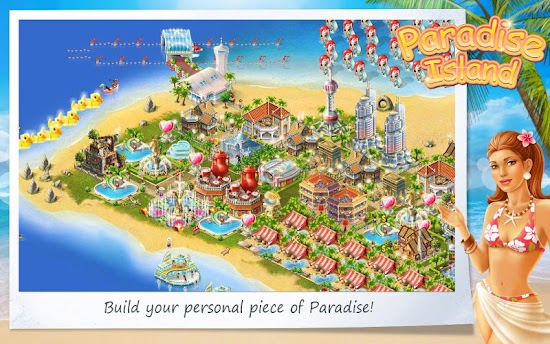
Paradise Island Apk


Description
Be warned: Paradise Island is very addictive, even if youve never played this kind of game before.
androidzoom.com

"Paradise Island" is the game for all sun and sea lovers!
Tear yourself away from work and build your own sunny island!
Is it time to make your own business? Just have some practice! Rich tourists are just about getting to your warm beaches! Entertain them in casinos and entertainment centers, build hotels, restaurants and discos! Build your own empire of entertainment! Turn your island into best resort empire and learn to manage your own business.

Game tasks:
- build all kinds of buildings on the Island;
- improve your buildings, repair them and gain profit;
- expand your property by buying new pieces of land and areas of sea;
- create your Island with unique buildings and plants;
- compete with your friends;
- set up your tourism business;
- build the city of your dream and turn your life into a happy story;
- learn all tips of the game receive all possible rewards and win the Grand Prize!

Game features:
- beautiful and detailed graphics;
- extremely addictive and interesting gameplay;
- life on your island goes on even when the game is closed;
- there is a big choice of facilities and constructions, decorations and plants;
- tycoon and simcity features;
- more advanced, than a regular farm game;
- more than 130 of awards and achievements;
- Internet connection is recommended, but not necessary;
- Ad Free.

Apps Details
-Price: Free
-Version: 2.3.11
-Size: 27 MB
-Required android: 2.2 and Up
-Developer: GIGL

Instruction:
-Install Apk
-Launch the App

Google Play Store : Visit Now

Check New version : Check Now

NOTE: Please report us by comment if there is Broken Link or Image

Have Request or Problem with game. Just Comment..!!
Thanx for your visit..Take around and see another games or application for your Android Divice. Dont forget to sharing my little blog to your friends on facebook, Twitter and etc. Come back tomorrow and see new application and amazing games on www.droapk.net for you !

26 Jul, 2013


-
Source: http://feedproxy.google.com/~r/Droapk/~3/7DoWlIgosNM/paradise-island-apk-2311-direct-link.html
--
Manage subscription | Powered by rssforward.com
Android Apk
Read More..

Friday, July 15, 2016

Apps Android : Spare Phone – VoIP Voice Calls v2.23 Android apk

Some comments from users:
"So easy – Just pop in my user name and pass 2 sec later i was making perfect calls. Asus prime was blown away on how simple it was"
"Best google voice app – Better than groove ip in audio quality I have used groove ip for almost a year and this one is way better for my phone and service providers I have a lg optimus v in virgin mobile network"
Spare Phone uses your WiFi,3G,4G data connection to place and receive Google Voice VoIP calls. All you need is the "Spare Phone" app, a data connection(Wireless or Mobile) and a free Google Voice account. Spare Phone transforms your Android phone or tablet into a free wireless phone when used over WiFi/Wireless in the USA and Canada!
Google Voice is currently free to place calls to the U.S. & Canada. Please visit https://www.google.com/voice to create a free Google Voice account and to get your free phone number. Also check out the great rates to other countries such as Mexico and India.
Note: To use 3G, 4G you must enable it in the settings of Spare Phone. This can be costly if you don’t have unlimited data. Please verify that your cell carrier allows VoIP data traffic before enabling this option. This app uses ~1.2 MB per minute during a call.
Disclaimers: Google Voice is a product of Google, Inc. and "Spare Phone" is not in any way affiliated or endorsed by Google Inc.
WARNING: Google Voice does not support 911 or any other type of emergency calls!
If you have any suggestions or issues please contact:
androidtouchdev [at] gmail.com
Frequently Asked Questions:
1.) Does this use my cell phone minutes?
Answer: No, Spare Phone uses your wireless/data connection and your Google Voice account for calls. You don’t even need cell phone service to use this app. Note: If you are not using WiFi you will pay for your cellular data usage.
2.) Is this a simple callback app?
Answer: No, this is a pure VoIP(Voice over IP) calling app that communicates directly without any additional latency. You DO NOT need a SIP client or callback app to place and receive calls.
3.) Will this work with an Android tablet?
Answer: Yes, Spare Phone will enable your Android tablet to place and receive calls. It will also work with Wi-Fi only tablets too.
4.) I’m not receiving incoming calls. Help!?
Answer: To receive incoming calls you must enable ‘Google chat’ as one of your phones to ring in the Google Voice settings. Just make sure you don’t have the cell phone you’re using and ‘Google chat’ enabled simultaneously.
5.) Calls seem to have issues when my screen turns off.
Answer: In the settings enable ‘Keep Screen On’ as some devices put the wireless connection to sleep when the screen is off.
6.) I can’t login or place calls with my mobile data connection.
Answer: To use 3G,4G you must enable this in the settings. Only wireless is allowed by default. As noted above, mobile data can be costly if you don’t have unlimited data. Please verify that your cell carrier allows VoIP data traffic before enabling this option. This application uses ~1.2 MB per minute during a call.
7.) I have some other issue or a suggestion. Help!
Answer: Please email androidtouchdev [at] gmail.com
Thank you for supporting Spare Phone!
What’s in this version:
v2.23
Android 2.2 login fix
v2.22
Nexus 4 improvements
v2.21
echo cancellation
v2.20
orientation setting
improved dtmf
tcp audio for restricted networks
v2.18
contact specific ringtones
client priority
bluetooth options
updated built-in help
recent:
OAuth 2.0
Notification options
battery usage improvements. Setting is ‘CPU Sleep’.
Note: If you have connection issues please disable ‘CPU Sleep’.
Favorite contacts
‘Ring & Vibrate’
native dialer integration
manage forwarding phones
This app has NO advertisements

Google Play

Android Apk
Read More..